 Anymark
How to turn a scanned document into Markdown, offline · Anymark
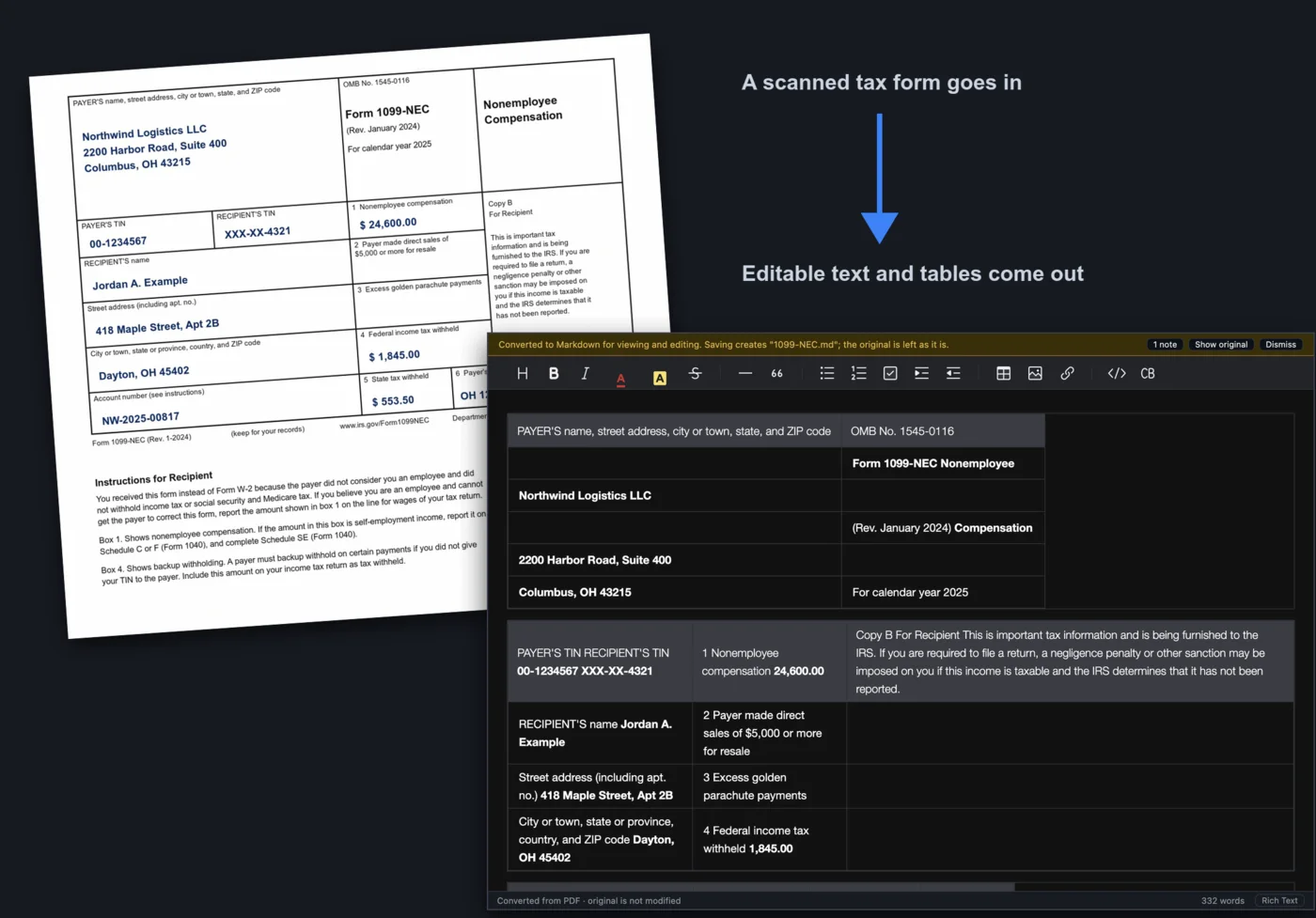
A scan is a picture: there is no text in it to copy. Most OCR tools send the picture to a server to be read. Anymark reads it on your own computer, with no internet connection needed, and gives you Markdown with paragraphs, headings, lists and tables rather than a wall of lines.
Read a scan in three steps
- Open the scan. A scanned PDF, a fax, or a phone photo saved as PDF all work. Pages fed in sideways or upside down are turned the right way, and show-through and ruling lines are cleaned away before reading.
- Check the text. OCR is good but not perfect: glance over names and numbers. Edit anything directly, or switch to the Markdown source with ⌘/Ctrl+/.
- Save the
.mdbeside the scan. Barcodes, stamps and signatures are kept as pictures.
Other languages
English is included. Twenty more languages can be added from Tools > OCR Languages; each is downloaded once and then works offline.
Private documents
Because nothing is uploaded, scanning tax forms, medical letters, bank statements or contracts into Markdown is as private as opening them.
Try it on your own files. The full app, free for seven days, no card. Then $9.99 once, for life.
Download for Mac or Windows